🚀 Welcome to SecuraScan: Your Mobile Security Sidekick!
In the fast-paced world of mobile development, security can sometimes take a backseat. That’s why I built SecuraScan — a lightweight, experimental app security scanner designed for mobile enthusiasts and developers who want quick, actionable insights without the overhead of complex tools.

Why SecuraScan?
🔐 Because Every App Deserves a Security Checkup
Security audits can be daunting, but they don’t have to be. With SecuraScan, you get an easy-to-use tool built with modern Kotlin and Compose for Desktop, bridging the gap between powerful analysis and everyday developer workflows.
Mobile security is a massive battlefield. Apps bundle tons of SDKs, native libraries, permissions, and config flags — any of which can introduce vulnerabilities. Instead of wrestling with platform-specific tools or complex pipelines, I wanted something that could just scan your APK or IPA and tell you what’s up, fast.
SecuraScan is that quick sanity check — a kind of “first responder” for mobile app security, letting you peek into app manifests, native code, and embedded secrets from a single, slick desktop UI. It’s not a full-fledged security suite (yet!), but it’s a strong first step toward that goal.
Tech Stack & Why Compose for Desktop?
I’m a huge fan of Kotlin and Jetpack Compose, so building SecuraScan with Jetpack Compose for Desktop made perfect sense:
- Cross-platform by design — a shared Compose Desktop foundation; the published installer is currently for macOS.
- Reactive UI magic — the app updates instantly as scans progress, giving smooth feedback.
- Rapid iteration — Compose’s declarative style makes tweaking UI and adding features super fast.
- Seamless packaging — Gradle lets me bundle native installers (.msi, .dmg, .deb) easily for any desktop OS.
For a mobile dev who loves Kotlin, Compose Desktop feels like the natural playground for experimenting with desktop apps that complement mobile workflows.
What Can SecuraScan Do Today?
Here’s what it’s checking out for you right now — think of it as your personal mobile app security scout:
- Manifest & Permissions — flags risky exported components and dangerous permissions like SYSTEM_ALERT_WINDOW or READ_SMS.
- Config Flags — spots if your app is accidentally shipped debuggable, or if cleartext network traffic is allowed.
- Embedded Secrets & Obfuscation — scans resources and native libraries for hardcoded keys, tokens, or XOR-obfuscated strings that scream “security risk.”
- Native JNI Code Inspection — digs into native .so libs and C++ JNI code, hunting for suspicious patterns or weak encryption.
- Root & Jailbreak Bypass Indicators — looks for known bypass libs or classes sneaking in, which attackers might exploit.
- Third-Party SDK Detection — spots embedded SDKs and trackers that might be privacy or security landmines.
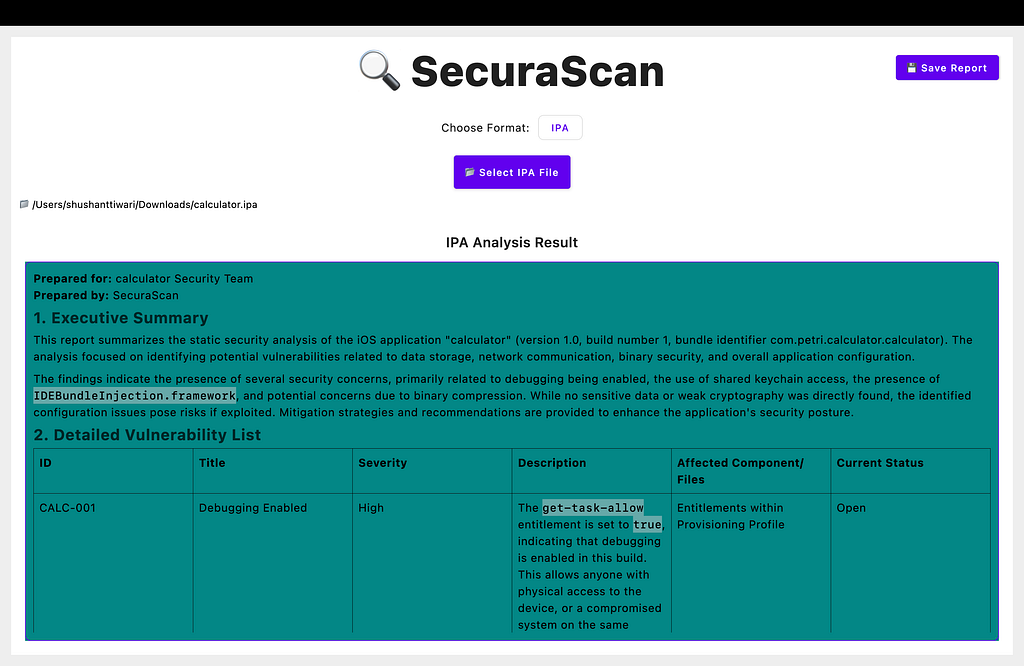
- Beautiful, Interactive HTML Reports — generates easy-to-digest reports with clear severity icons, summaries, and actionable advice.
Why Use SecuraScan?
- It’s fast & lightweight — ideal for quick checks during development or security reviews.
- Cross-platform — designed for a shared desktop codebase; Windows and Linux installers are not currently published.
- Open to growth — this is an experimental foundation with room to expand into a full mobile app security platform.
- Built with modern tools — Compose for Desktop gives it a clean, native UI without the overhead of heavyweight frameworks.
What’s Next?
I’m looking at integrating dynamic analysis, CI/CD hooks, and even some AI-powered vulnerability triage down the line. But for now, SecuraScan is a handy sidekick for mobile developers and security enthusiasts who want to catch low-hanging fruit before shipping.
Get Started
If you’re a mobile dev or security buff curious about static app analysis — or just want a cool Kotlin Compose desktop app to mess around with — download the published macOS DMG from https://github.com/dev-shushant/SecuraScan-1.0.0/releases/tag/v1.0.0 and explore the documented APK/IPA analysis workflow. Windows and Linux installers are not currently available.
Usage
- Open your APK or IPA file via the file menu
- Let SecuraScan analyze the package — results appear in real-time
- Review detected risks with severity icons and detailed info
- Export the report as an interactive HTML file for sharing or record-keeping
Conclusion
🔍 SecuraScan is more than just a tool — it’s a passion project born from the drive to empower mobile developers and security enthusiasts with fast, accessible, and insightful app security analysis. 🚀 By harnessing the power of Kotlin and Jetpack Compose for Desktop, SecuraScan bridges the gap between complex security audits and everyday developer workflows. While it’s currently a lightweight, quick-check utility, it paves the way for more comprehensive, automated mobile security solutions that keep your apps safer 🔒 and your users protected 👥.
Whether you’re an Android or iOS developer, a security professional, or a curious mobile enthusiast 📱, SecuraScan invites you to explore, contribute, and elevate your app’s security posture — one scan at a time. Let’s build safer apps together. 💪
Because when it comes to mobile security, every little scan counts. ⚡️
🔽 Try SecuraScan Now!
🚀 Ready to explore your mobile app’s security?
👉 Download SecuraScan for macOS (.dmg)
💡 The public release currently contains a macOS DMG. Windows and Linux installers remain future work; no release date is confirmed. Scan findings need manual review and do not establish that an app is secure. The public repository contains release documentation and the binary, rather than the analyzer source.